
Blog
The Complete Guide to Instagram Carousel Sizes, Specs & Formats (2026)
A complete 2026 guide to Instagram carousel dimensions, aspect ratios, file formats, slide limits, safe zones, and repurposing specs.
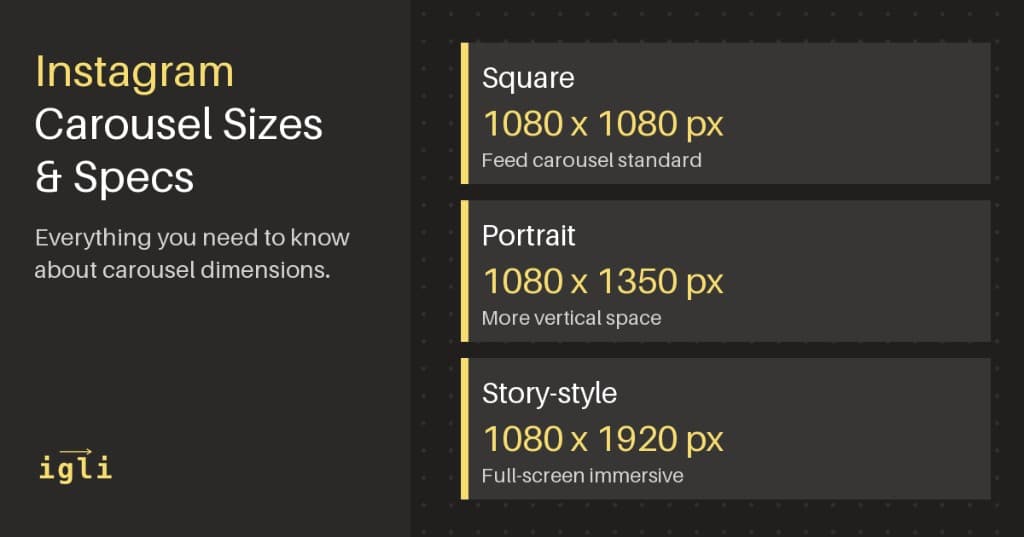
If you've ever spent time designing the perfect Instagram carousel only to have it look pixelated, cropped, or just off - you're not alone. Getting your carousel dimensions right is the difference between content that stops the scroll and content that gets ignored.
This guide covers everything you need to know about Instagram carousel sizes, specs, and formats in 2026 - so you can create carousels that look sharp on every device.
Quick Reference: Instagram Carousel Dimensions
Here's the TL;DR for the dimension specs you need:
| Format | Dimensions | Aspect Ratio | Best For |
|---|---|---|---|
| Square | 1080 x 1080px | 1:1 | Product shots, quotes, simple graphics |
| Portrait | 1080 x 1350px | 4:5 | Educational content, storytelling, maximum feed presence |
| Landscape | 1080 x 566px | 1.91:1 | Panoramic shots, behind-the-scenes |
| Story-style | 1080 x 1920px | 9:16 | Full-screen takeovers (note: crops in feed) |
Pro tip: Portrait (4:5) carousels take up more screen real estate in the feed than square or landscape - which means more eyeballs and higher engagement rates. If you're trying to maximize reach, go portrait.
Already designed your carousel? Reformat it for LinkedIn
igli resizes your Instagram slides to LinkedIn's document dimensions and exports a single PDF in about 30 seconds.
Designing for one platform but planning to cross-post? It helps to know the target specs up front. See how Instagram stacks up against LinkedIn in our Instagram carousel vs. LinkedIn carousel breakdown, and the full LinkedIn carousel specs guide.
Optimal Carousel Dimensions Explained
Square Carousels (1080 x 1080px)
The classic Instagram format. Square carousels are clean, predictable, and work well for:
- Product grids and catalog-style posts
- Quote graphics
- Step-by-step tutorials with numbered slides
- Minimalist brand content
Square is still popular, but it's no longer the default recommendation. Why? Because you're leaving screen real estate on the table.
Portrait Carousels (1080 x 1350px) - The Sweet Spot
This is the format most content creators should default to. At 4:5 aspect ratio, portrait carousels:
- Take up ~30% more vertical space in the feed than square
- Feel more immersive on mobile (where 90%+ of Instagram usage happens)
- Give you more room for text, graphics, and storytelling
- Consistently outperform square in engagement metrics
If you're creating educational carousels, listicles, or story-driven content - portrait is your format.
Landscape Carousels (1080 x 566px)
Landscape carousels have niche use cases:
- Cinematic shots and panoramas
- Behind-the-scenes content
- Photo stories where the horizontal format serves the narrative
The downside: landscape takes up the least feed real estate, which can hurt discoverability. Use it intentionally, not by default.
Story-Style in Carousels (1080 x 1920px)
You can upload 9:16 content to carousels, but Instagram will crop it in the feed. The full image only displays when users tap to expand. This format works for:
- Bold visual statements designed to drive taps
- Content that also gets repurposed to Stories/Reels
Most creators stick with 4:5 to avoid unexpected cropping.
File Format Requirements
Instagram accepts multiple file types, but not all are created equal.
Image Formats
| Format | Supported | Notes |
|---|---|---|
| JPEG | ✅Yes | Best compression-to-quality balance |
| PNG | ✅Yes | Better for graphics with text/transparency |
| GIF | ⚠️Limited | Converts to static image |
| WebP | ❌No | Convert to JPEG/PNG before uploading |
Recommendation: Export educational carousels as PNG for crisp text. Export photo-heavy carousels as JPEG for smaller file sizes.
Video Formats for Mixed-Media Carousels
Carousels can include up to 10 slides, mixing images and videos. Here are the video specs:
| Spec | Requirement |
|---|---|
| Format | MP4, MOV |
| Resolution | Minimum 600 x 600px; recommended 1080 x 1080px or 1080 x 1350px |
| Length | 3 seconds - 60 seconds per video slide |
| Frame rate | 30fps recommended |
| Max file size | 4GB |
| Codec | H.264 compression |
Videos in carousels auto-play with sound off by default, so make sure your content works without audio (or add captions).
Carousel Slide Limits
Instagram carousels support up to 20 slides per post (updated from the original 10-slide limit). This gives creators more room for:
- Extended tutorials and how-to guides
- Full-length presentations
- Multi-chapter storytelling
- Comprehensive listicles
Just because you can use 20 slides doesn't mean you should. Engagement tends to peak around slides 3-7. Front-load your best content.
Safe Zones and Text Placement
Here's where many creators get tripped up. Even if your dimensions are technically correct, poor text placement can make your carousel look broken.
The Caption Overlap Zone
When users view your carousel in their feed, the bottom ~250px gets partially obscured by:
- Your profile picture and username overlay
- The "like, comment, share, save" action bar
- Caption preview text
Rule of thumb: Keep critical text and key visuals at least 250px from the bottom edge on the first slide. On subsequent slides, 150px is usually safe.
Swipe Indicator Safe Zone
On multi-slide carousels, Instagram shows dot indicators at the bottom center. Avoid placing text or small details in the center-bottom region of your slides.
Padding Best Practices
- Use 60-100px padding on all edges for text-heavy slides
- Center key messages in the middle 60% of the slide
- Test your carousel on an actual phone before posting
Aspect Ratio and Algorithm Performance
Here's something most guides don't tell you: aspect ratio impacts reach, not just aesthetics.
Portrait (4:5) carousels perform better because:
- More dwell time - Larger images take longer to scroll past, which signals engagement to the algorithm
- Higher tap-through - More visual impact means more users swipe through all slides
- Better for storytelling - More vertical space lets you build narrative tension across slides
When Instagram's algorithm calculates engagement, it factors in time spent on post, swipe-through rate, and saves. Portrait carousels naturally optimize for all three.
Common Mistakes to Avoid
1. Designing at the Wrong Resolution
Always design at 1080px wide minimum. Designing at smaller sizes (like 612 x 612px, the old standard) and upscaling leads to blurry content.
2. Inconsistent Aspect Ratios Across Slides
All slides in a carousel share the same aspect ratio. If you upload a square and a portrait image in the same carousel, Instagram will crop them to match. Design all slides at the same dimensions.
3. Ignoring Mobile Preview
Your carousel will be viewed on phones 90%+ of the time. Always preview on mobile before posting - what looks great on your laptop may have text too small to read on a 6-inch screen.
4. Overloading Slides with Text
Instagram is visual-first. Aim for 30-50 words per slide max. If you need more text, split it across multiple slides.
5. Forgetting About the First Slide
Your first slide is your hook. It appears in the feed, in search, and on your profile grid. Make it count. Save the detailed content for slides 2+.
Quick Checklist Before You Post
- Dimensions: 1080 x 1350px (portrait) or 1080 x 1080px (square)
- File format: PNG for graphics, JPEG for photos
- Text at least 250px from bottom edge on slide 1
- All slides same aspect ratio
- First slide has a clear hook
- Tested on mobile
- Under 20 slides
Frequently Asked Questions
What is the best Instagram carousel size in 2026?
For most creators, 1080 × 1350px (4:5 portrait) is the best Instagram carousel size. It takes up the most feed real estate on mobile and consistently drives higher engagement than square or landscape.
How many slides can an Instagram carousel have?
Instagram carousels support up to 20 slides per post. Engagement usually peaks between slides 3–7, so front-load your strongest content.
What aspect ratio should all my carousel slides be?
Every slide in a single carousel must share the same aspect ratio. Mixing a square and a portrait image forces Instagram to crop them to match — design all slides at identical dimensions (1080 × 1350px or 1080 × 1080px).
What size do I need to post an Instagram carousel on LinkedIn?
LinkedIn carousels are PDF document posts that look best at 1080 × 1080px (square) or 1920 × 1080px (landscape). You'll need to reformat 4:5 Instagram slides and merge them into a PDF — igli does this automatically.
Repurposing Carousels for Other Platforms
Created the perfect Instagram carousel? Now what happens when you want to post it on LinkedIn?
Different platform, different specs:
| Platform | Optimal Carousel Size | Aspect Ratio |
|---|---|---|
| 1080 x 1350px | 4:5 | |
| 1080 x 1080px or 1920 x 1080px | 1:1 or 16:9 | |
| Twitter/X | 1600 x 900px | 16:9 |
Reformatting your Instagram carousel for LinkedIn manually is a 20-60 minute job: re-exporting slides, resizing dimensions, re-adjusting text that got cut off, copy-pasting captions one by one.
Or you can do it in 30 seconds.
igli.app turns Instagram carousels into LinkedIn-ready posts with a single drag-and-drop. No more manual reformatting. No more wasted time.
If you're cross-posting carousel content - and you should be - try igli free and get that time back.